Your cases, deadlines and fees in one place, with a portal so your clients can follow their case.
For firms that today combine shared folders, spreadsheets and WhatsApp. Every procedural deadline with its alert, every case with its timeline and documents, hours logged and invoiced, and a mobile portal where the client sees the status of their case, chats with the firm and pays via SINPE.
Fictional firm, people, case numbers and amounts. The demo doesn't connect to any court or bank.Watch the demo in 51 seconds
A deadline that gets met, a case file with its documents and notes, hours that turn into a fee statement and a client who pays it from their phone. Then try it yourself: everything works in your browser.
The firm's day-to-day and the client's peace of mind, in the same system
The demo shows a fictional firm in San José with eight cases across different practice areas. In a real project we adjust it to your practice areas, your statuses and the way you work.
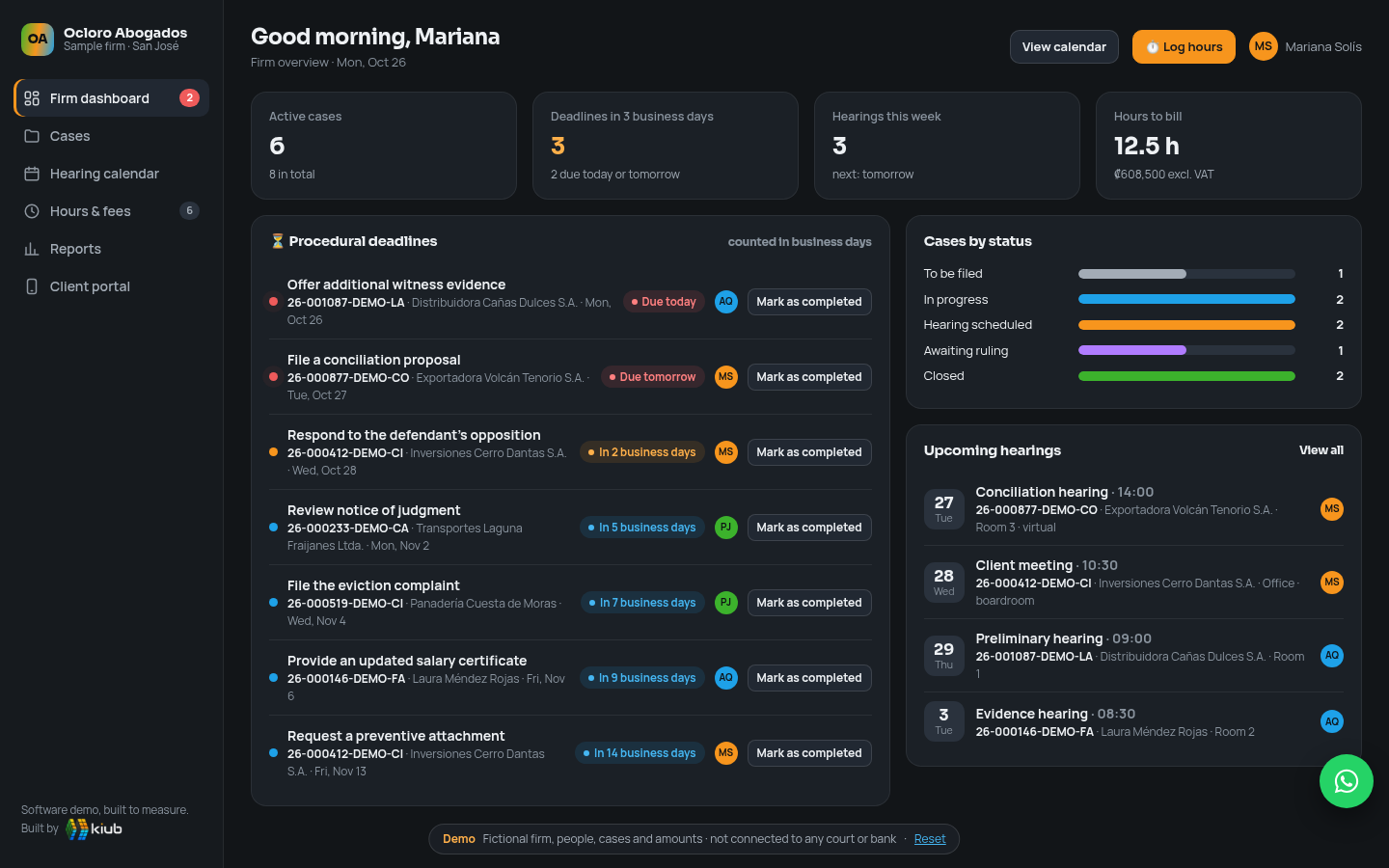
Dashboard and procedural deadlines
Cases by status, due dates counted in business days and alerts by urgency: due today, tomorrow or in the next few days. Deadlines are logged and visible to the whole team, with alerts before they're due.
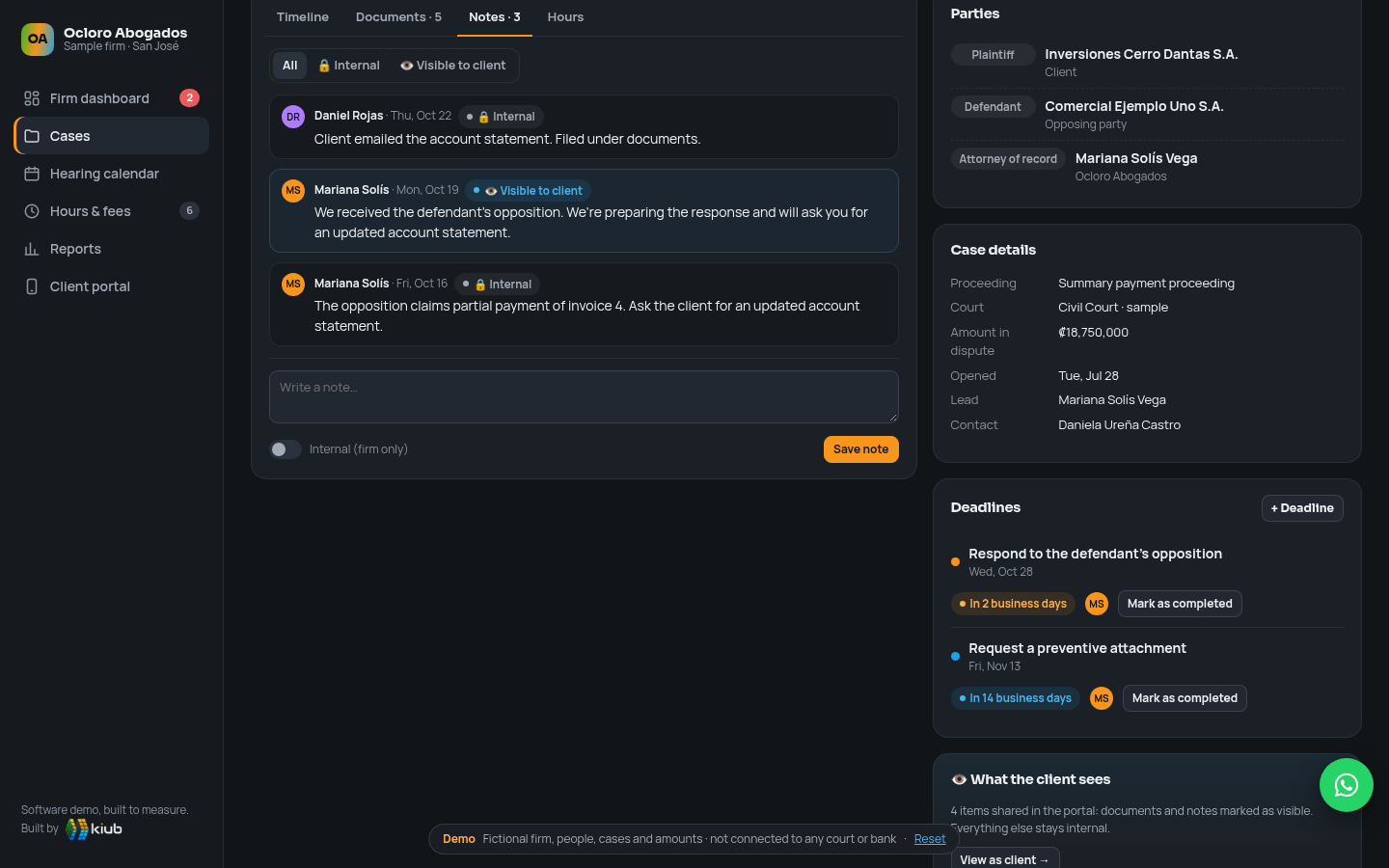
Case file
Parties, a timeline of proceedings, documents and deadlines. Notes can be internal or visible to the client, and you decide which documents the portal shares.
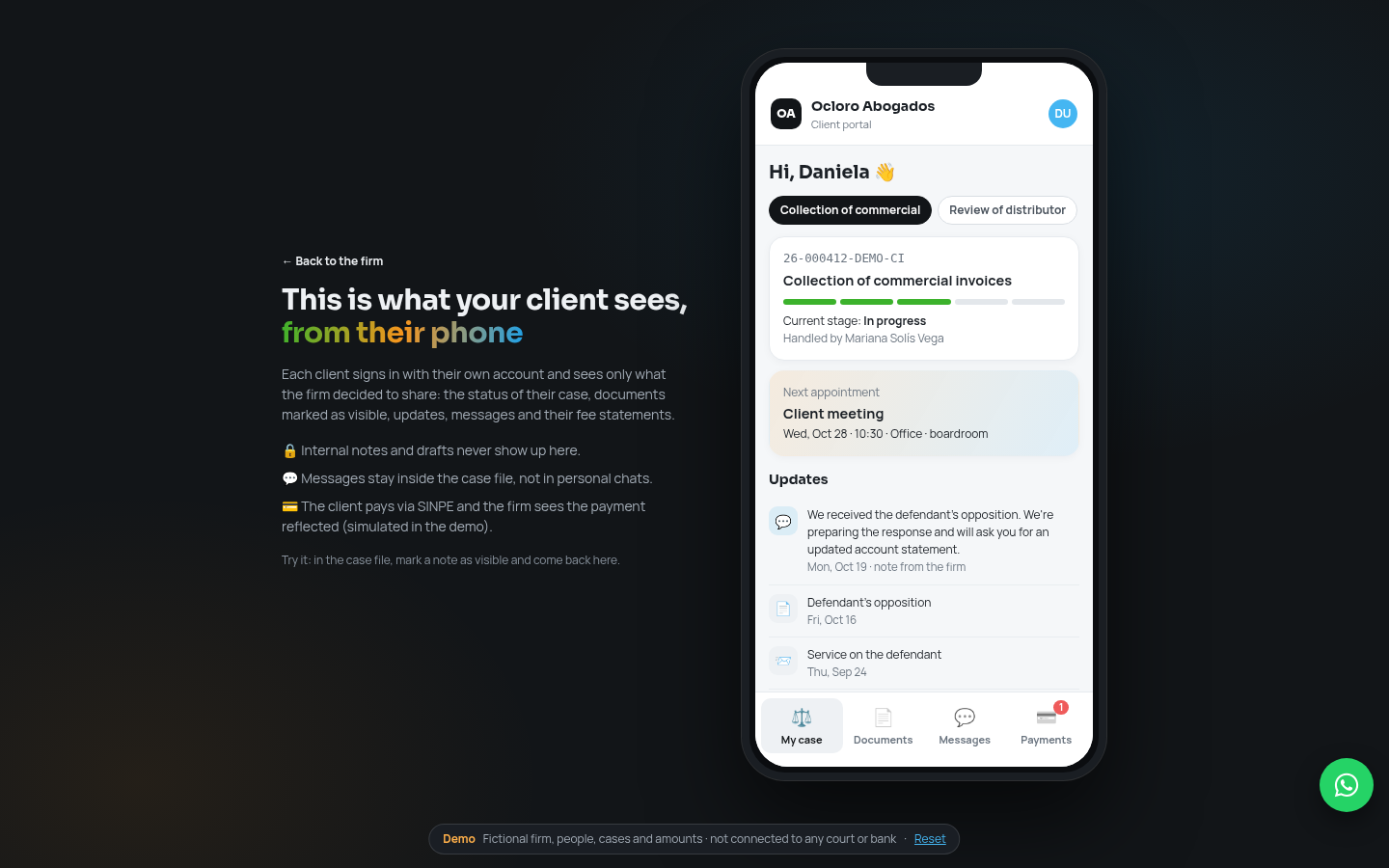
Client portal
From their phone, your client sees the status of their case, their upcoming appointments, shared documents and messages with the firm. Fewer “how's my case going?” calls.
Fees and SINPE payment
Timer or manual hour logging, rate per person, fee statement with VAT and payment via SINPE Móvil or bank transfer from the portal (simulated in the demo).
Hearing calendar
Hearings, meetings and due dates in a two-week view, with the person responsible for each. The appointment also shows up in the client portal.
Reports
Fees issued and collected, billable hours per person against target, cases by practice area and accounts receivable.
Clio, MyCase and PracticePanther are solid products. The question is how well they fit a firm in Costa Rica.
If your firm is small and works well with ready-made software, it will probably cost you less in the first few years, and we'll say so plainly. Custom makes sense when you want your own client portal, to charge via SINPE with VAT and invoices under Hacienda regulations, and to have deadlines follow the local court calendar, without paying more for each new person.
Designed for Costa Rica
Deadlines in business days with holidays and collective closures, colones, VAT and invoices under current Hacienda regulations. The platforms compared are designed first for the US (LEDES, UTBMS, IOLTA accounts).
No per-user charge
Adding attorneys, assistants or interns doesn't raise the monthly fee. In the plans compared, every user is one more license.
Your portal, with your brand
Your clients log into a portal with your firm's name and see exactly what you decide to share, case by case.
Payment via SINPE
SINPE Móvil or bank transfer to the firm's account number, and the payment is reflected in the fee statement. The platforms compared charge by card or eCheck with a per-transaction fee.
The data is yours
Cases, documents and fees stay in your system and in your cloud. If you switch providers one day, you take everything with you.
Support in Spanish and in your time zone
You talk directly to the people who built it, from Escazú, and we tune it with the firm's real use.
Cumulative total cost
- kiub: development from US$3,500 to 4,900 (estimate in this proposal) + an assumed US$50/month for hosting, document storage, backups and basic support. That assumption is not an official kiub rate; it is defined in the proposal.
- Firm with 4 or 8 users (attorneys and administrative staff). All the platforms compared charge per user per month.
- It's not an identical comparison: Clio Starter doesn't include the client portal (it starts at the Core plan, whose price the page doesn't publish) and MyCase Basic's portal is limited. We include them as a low-cost reference.
- Does not include fees for card or eCheck payments, add-ons (for example, MyCase accounting at US$39 per user), data migration, taxes or integrations with Hacienda e-invoicing or SINPE, which on those platforms are not part of the plan.
- The platforms do include years of product development, mobile apps, constant updates and, on some plans, AI features. With custom, future improvements are quoted separately.
Official prices checked
| Platform and plan | Annual | Monthly | Official source |
|---|---|---|---|
| Clio · Starter no client portal | from 49 | clio.com ↗ checked Oct 22, 2026 | |
| Clio · Core, Signature, Elite portal from Core | not published | ||
| MyCase · Basic limited portal | 50 | 60 | mycase.com ↗ checked Oct 22, 2026 |
| MyCase · Pro workflows, CRM, AI assistant | 100 | 120 | |
| MyCase · Advanced | 130 | 150 | |
| PracticePanther · Solo | 49 | 59 | practicepanther.com ↗ checked Oct 22, 2026 |
| PracticePanther · Essential | 69 | 79 | |
| PracticePanther · Business | 89 | 99 | |
| PracticePanther · Business Pro | 114 | 124 | |
| LemonSuite (Lemontech, LatAm) Essential and Professional | not published | lemontech.com ↗ checked Oct 22, 2026 | |
| LegalSurf (LatAm) · Pro 5 to 10 users | US$99/month | legal.surf ↗ checked Oct 22, 2026 | |
- Clio: the page says “from US$49 per user” and asks you to contact sales for the other plans. Card payments: 2.95% per transaction; eCheck: 1%.
- MyCase: no long-term contract or setup fee; accounting is an add-on at US$39 per user per month.
- PracticePanther: the secure client portal is included in all plans.
- LemonSuite: its plan pages ask you to book a demo and don't show a price.
- LegalSurf: shows US$99/month for its Pro plan (35% off the first year when you book a demo); the page doesn't make clear the currency or whether the amount is per user, so we left it out of the chart.
Step by step, with visible progress
We understand how your firm works first and deliver in blocks. Your team tests each part with real cases before the portal is opened to clients.
Understand
Practice areas, statuses, deadline types, how you bill today and what the client should see. We define the scope and the final price.
Build and test
Dashboard, cases, documents, calendar, hours and fees, and the client portal. Demos every week with your team.
Migrate and launch
We load your cases from Excel or folders, train the team and open the portal to the first clients.
A clear estimate from the start
Low end
- Dashboard, cases and deadlines in business days with email alerts
- Documents and notes, internal or visible to the client
- Client portal: status, documents and messages
- Hour logging and fee statements
- Hearing calendar and basic reports
High end
- SINPE payment tracking with receipt reconciliation
- Invoices under current Hacienda regulations when the fee statement is issued, directly or through your provider
- WhatsApp or SMS reminders to clients
- Roles and permissions per attorney and per client
- Migration of cases from Excel or folders
A chat assistant inside the portal that answers questions about your data with tables, charts and reports you can export to PDF or HTML. For example:
- “Which deadlines expire in the next 15 days?”
- “Open cases by attorney”
- “Pending fees by client”
The data is made up. The work isn't.
This demo doesn't correspond to any client: the firm, the people, the case numbers and the amounts are fictional. What is real is kiub's experience building custom systems for teams that work with us today.
“The system has helped us enormously to improve the organization of our company. We now have better control over project billing and can follow our team's work more closely, making day-to-day management easier.”
Before you start
Does it connect to the court system (Poder Judicial)?
The demo doesn't connect to any court. In a real project, the firm records the proceedings and deadlines in the system; if there is an official and stable way to query information, we evaluate together whether it's worth integrating.
How are deadlines calculated?
In business days: the system skips weekends and, in the real version, the holidays and collective closures you configure. The alert is an aid; the responsibility for verifying each deadline remains with the firm.
What exactly does the client see?
Only what you mark as visible: documents, progress notes, appointments and fee statements. Internal notes, drafts and strategy never appear in the portal.
How does the SINPE payment work?
In the demo it's simulated. In the real system the client sees the firm's SINPE Móvil number or IBAN account and the exact amount; the payment is confirmed with the receipt or by reconciling the bank account.
Where do the documents live and who has access?
In a cloud we choose with you, with daily backups, per-user access and a log of who opened or shared each document. The data and the code are yours.
Why not use Clio, MyCase or PracticePanther?
They're good products and, for many firms, the fastest option. Custom makes sense when you want a portal with your brand, SINPE payment with VAT and invoices under Hacienda regulations, deadlines that follow Costa Rica's court calendar and no per-user charge. The comparison with sources and assumptions is above.

Real engineering, powered by AI
Code that is reviewed, tested and maintained. AI speeds things up, people stand behind the work. That's why we can offer affordable prices.
- ✔ Reviewed
- ✔ Tested
- ✔ Maintained
Want a portal like this for your firm?
With your practice areas, your deadlines and your way of billing.
Tell us how you manage cases today. We'll reply within 24 hours with the next steps.
WhatsApp: Costa Rica +506 6451 1884 · USA +1 786 603 9420