A CRM with a sales pipeline and billing that works like your team does, not the other way around.
Follow every opportunity from first contact to the SINPE payment. Drag cards across the pipeline, review each client's record, track invoices in colones and dollars and let automatic reminders follow up on payments.
Fictional companies, people and amounts.
Watch the demo in 49 seconds
From the morning summary to collecting an overdue invoice, in a single walkthrough. Then try it yourself: everything works in your browser.
The whole sales cycle in a single system
These are the demo's modules. In a real project we adjust them to your sales stages, your billing rules and your current tools.
Monthly summary
Open pipeline, weighted forecast, what's been won and what's still to collect, on a single screen.
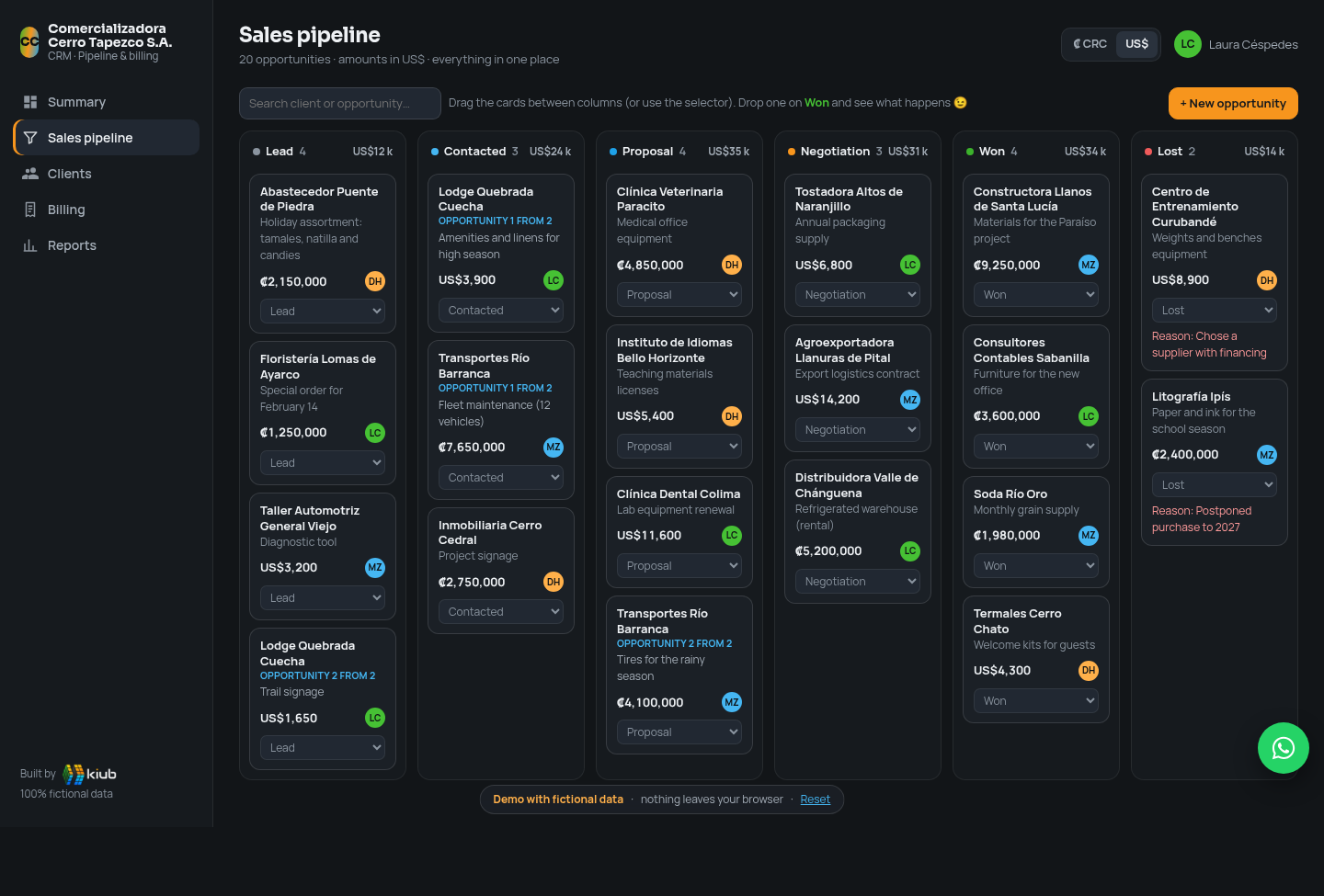
Kanban pipeline
Lead, contacted, proposal, negotiation, won or lost. Drag the card and the system logs it. If it's "Won", there's a celebration.
Client record
Contact details, opportunities, invoices and a log of calls, emails and notes for each account.
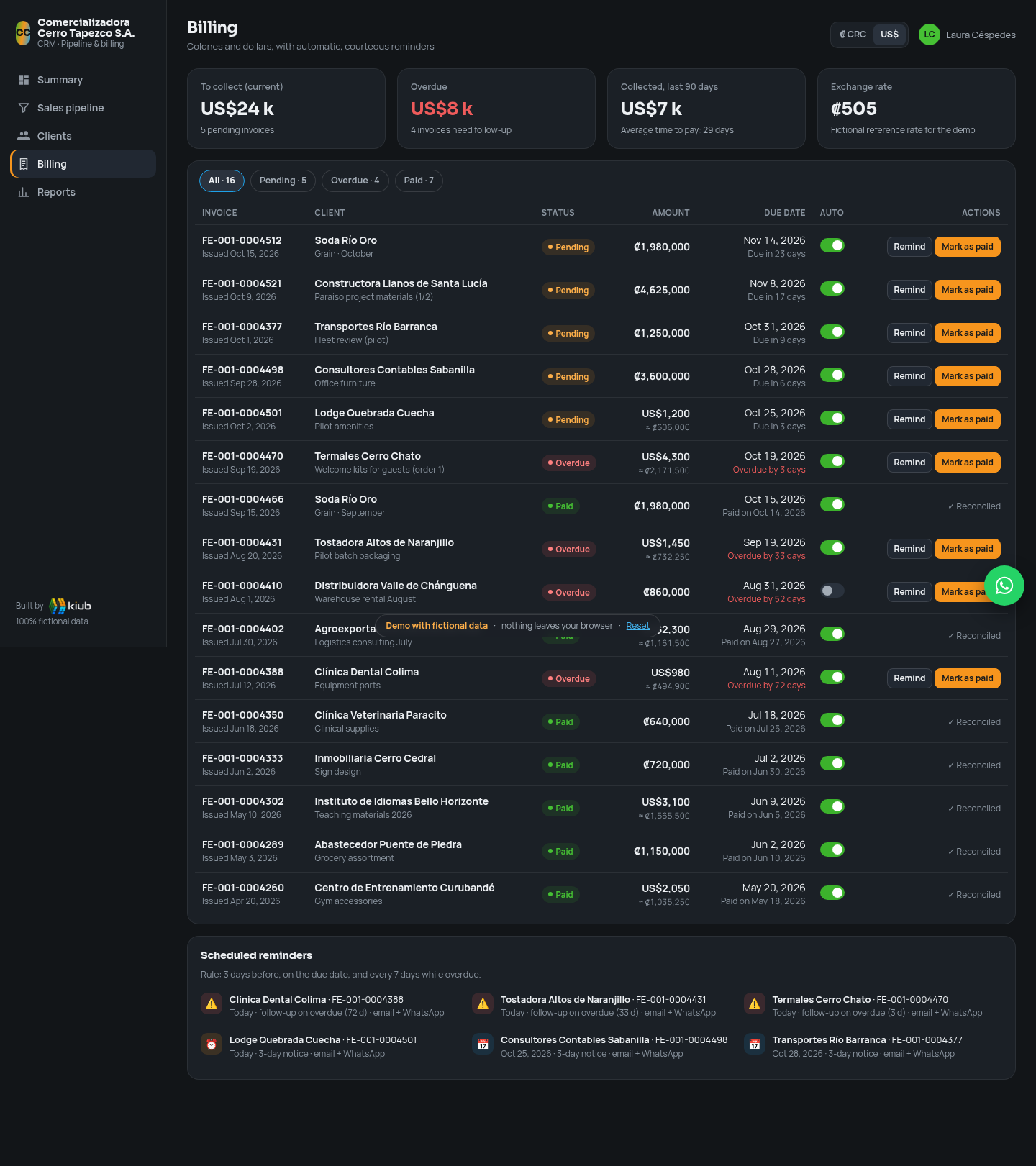
Billing in ₡ and US$
Pending, paid and overdue, with days late, currency conversion and payments via SINPE Móvil or bank transfer.
Automatic reminders
Email or WhatsApp notices before and after the due date. Friendly and on time, so your team doesn't have to chase every payment.
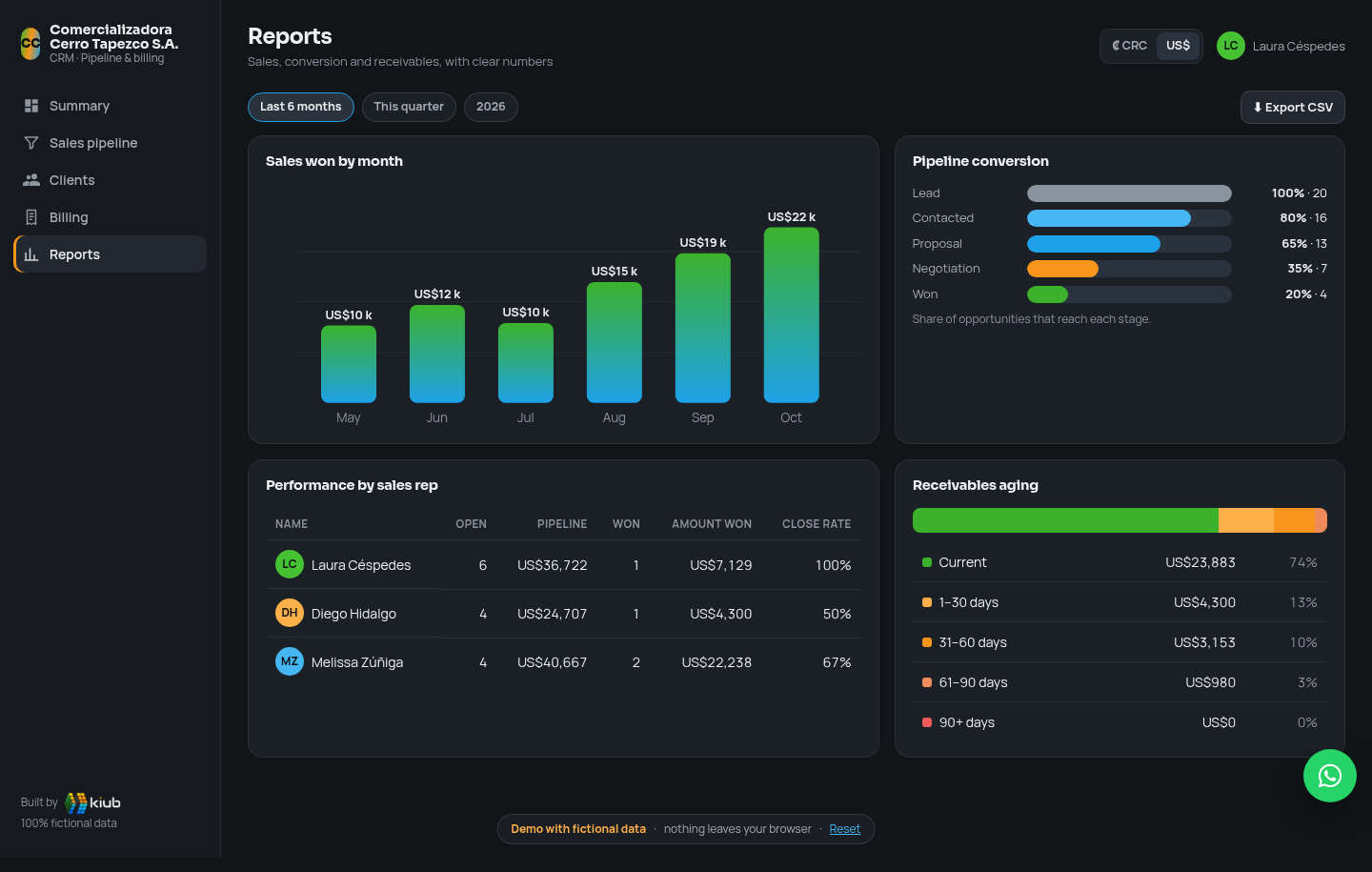
Reports
Sales by month, pipeline conversion, performance by sales rep and receivables aging, with CSV export.
HubSpot, Salesforce, Pipedrive and Zoho are good. But you pay per user, every month, forever.
An off-the-shelf CRM is like renting: you get started fast, but the bill grows with every person you add, and you adapt to the way they designed the process. A custom one is like building your own home: you invest once, it's made your way and it's yours.
No per-user licenses
Adding the new sales rep doesn't raise the monthly bill. With an off-the-shelf CRM, every user is one more license paid month after month.
The code and the data are yours
We hand over the system and your information. You don't depend on a subscription to keep using what you built.
Built around how you work
Your stages, your fields and your billing rules. You don't bend your team around menus designed for another market.
Invoices under Hacienda regulations
We prepare the system to issue invoices under current Hacienda regulations, directly or through your provider, so they go out of the same system where you closed the deal.
SINPE Móvil and WhatsApp
Payment logging via SINPE Móvil or bank transfer and WhatsApp Business reminders, the way people get paid in Costa Rica.
Local support, in your language
You talk directly to the people who built it, from Escazú, in your own time zone.
Cumulative total cost
Let's be honest: with 5 users, Zoho Professional comes out close to kiub's range over 3 years. The difference is in what the table doesn't show: the system is yours, it's built around your process and the cost doesn't go up as your team grows. Try it with 10 users.
- kiub: estimated development US$2,800–4,500 (reference price, depends on scope) + an assumed US$40/month for hosting, backups and basic support. That assumption is not an official kiub rate; it is defined in the proposal.
- Off-the-shelf CRMs: price per user per month on annual billing, as shown on their official page. Does not include taxes, add-ons, AI credits, extra storage or the integration with Hacienda or SINPE Móvil, which doesn't appear in their published plans.
- HubSpot Professional includes the mandatory one-time onboarding fee stated on its page (US$1,500).
- kiub doesn't charge per user; we assume the same cost with 5 or 10 users.
Official prices checked
| CRM and plan | Annual | Monthly | Official source |
|---|---|---|---|
| HubSpot · Starter | 7* | 20 | hubspot.com ↗ checked Oct 22, 2026 |
| HubSpot · Professional | 90* | 100 | |
| HubSpot · Enterprise | 150 | — | |
| Salesforce · Starter Suite | 25 | 25 | salesforce.com ↗ checked Oct 22, 2026 |
| Salesforce · Pro Suite | 100 | — | |
| Pipedrive · Lite | 14 | — | pipedrive.com ↗ checked Oct 22, 2026 |
| Pipedrive · Growth | 39 | — | |
| Pipedrive · Premium | 59 | — | |
| Pipedrive · Ultimate | 79 | — | |
| Zoho CRM · Standard | 14 | 20 | zoho.com ↗ checked Oct 22, 2026 |
| Zoho CRM · Professional | 23 | 35 | |
| Zoho CRM · Enterprise | 40 | 50 |
Step by step, with visible progress
This is how we work at kiub: we understand your business first and deliver in blocks, so you see progress at every stage and not just at the end.
Understand
We map your sales stages, how you invoice today and which reminders you need.
Build
Pipeline, clients, billing and reports, delivered in blocks that your team tests.
Scale
Go-live, loading your data, training and improvements based on real use.
A clear estimate from the start
- Kanban pipeline with your stages and fields
- Client record with activity log
- Invoices in colones and dollars, statuses and reminders
- Basic reports and export
- Users and roles for your team
- Training and support at launch
A chat assistant inside the CRM that answers questions about your data with tables, charts and reports you can export to PDF or HTML. For example:
- “Who owes me for more than 60 days?”
- “Sales by rep this quarter”
- “New clients this month by source”
The data is made up. The work isn't.
This demo doesn't correspond to any client: companies, people and amounts are fictional. What is real is kiub's experience building tracking and invoicing systems for teams that work with us today.
“The system has helped us enormously to improve the organization of our company. We now have better control over project billing and can follow our team's work more closely, making day-to-day management easier.”
Before you start
Does the demo save or send my data?
No. Everything happens in your browser and you can reset it whenever you like. Reminders and emails are only simulated.
Can I use my own sales stages?
Yes. Stages, fields and billing rules are defined with you during the Understand phase.
Does it issue invoices under Hacienda regulations and connect to SINPE Móvil or WhatsApp?
That's exactly the point of building it custom. We prepare the system to issue invoices under current Hacienda regulations, directly or through your provider. We review your bank and your WhatsApp Business, and we propose the integration that makes sense for your operation. In the demo these integrations are simulated.
Why not use HubSpot, Salesforce, Pipedrive or Zoho?
They're good tools and sometimes they're the best option. But as your team grows, you pay more every month for each user, and adapting them to how billing works in Costa Rica usually requires separate connectors or configuration. With kiub you pay for the development and the system is yours. The comparison with sources is above.
Are the prices in the comparison official?
The HubSpot, Salesforce, Pipedrive and Zoho prices come from their official pricing pages, checked on October 22, 2026, with the link next to each. They may change without notice. kiub's cost is a reference estimate plus a hosting and support assumption that is explained in the section.

Real engineering, powered by AI
Code that is reviewed, tested and maintained. AI speeds things up, people stand behind the work. That's why we can offer affordable prices.
- ✔ Reviewed
- ✔ Tested
- ✔ Maintained
Want a CRM like this for your business?
With your stages, your real clients and your way of getting paid. The confetti is optional (but recommended).
Tell us how you sell and invoice today. We'll reply within 24 hours with the next steps.
WhatsApp: Costa Rica +506 6451 1884 · USA +1 786 603 9420