Every part, which warehouse it's in and which car it fits, connected to your work orders.
For auto repair shops that also sell parts and today keep inventory in Excel or in their heads. You search by make, model and year, quote and send it to the customer on WhatsApp, the work order deducts what gets used, and the system tells you what to order, from whom and how much money you have tied up in parts that don't move.
Fictional shop, people, license plates, suppliers and amounts. The demo doesn't send messages or issue invoices.Watch the demo in 48 seconds
A search by vehicle, a quote the customer approves on WhatsApp, a work order that deducts parts from inventory and a supplier purchase that restocks whatever fell below the minimum. Then try it yourself: everything works in your browser.
From the counter to the lift, with the same inventory
The demo shows a fictional shop in Paraíso de Cartago with fifteen parts, three warehouses and five customers. In a real project we load your catalog, your warehouses, your suppliers and your pricing rules.
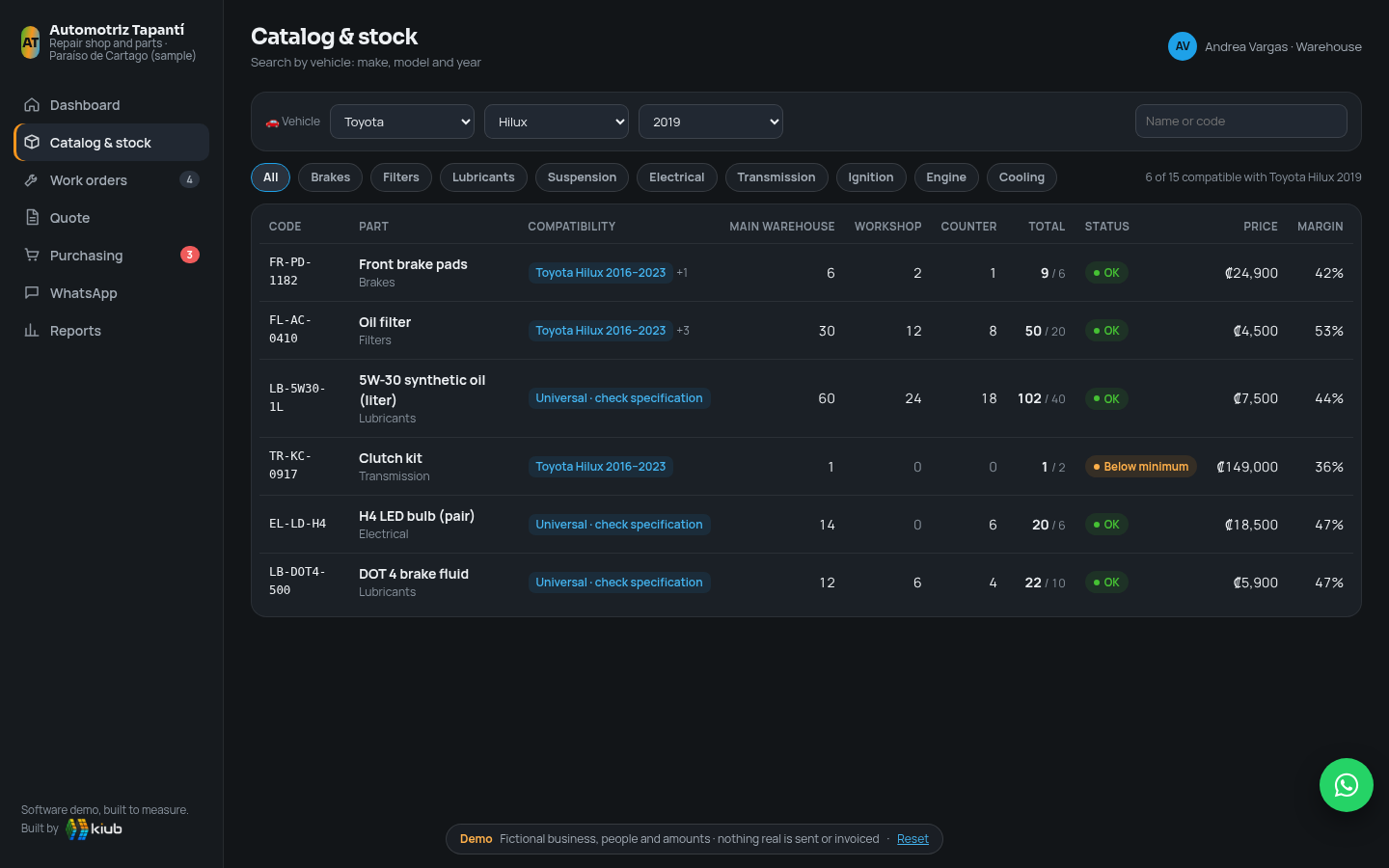
Compatibility by vehicle
Each part knows which make, model and range of years it fits. You pick the customer's car and see only what suits it, with stock and price.
Stock by warehouse
Main warehouse, workshop and counter separately, with minimums, alerts and transfers between warehouses. You know where each piece is before you go looking for it.
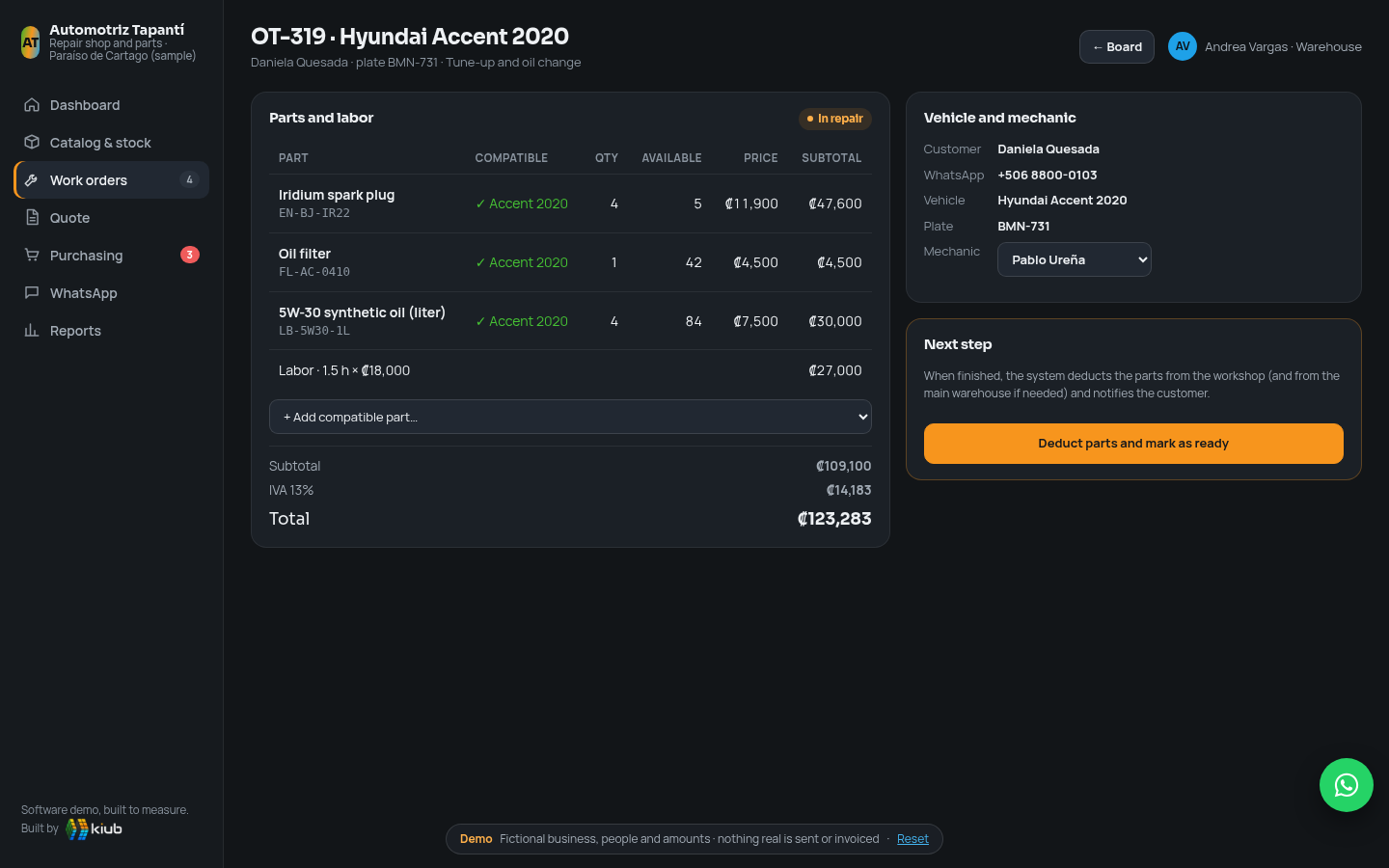
Work orders
A board by status, with the mechanic in charge, parts and labor. When you mark the order as ready, the system deducts the parts and notifies the customer.
Customer quote
Compatible parts, labor hours and VAT calculated. It's sent by WhatsApp and, when the customer approves, it becomes a work order with one click.
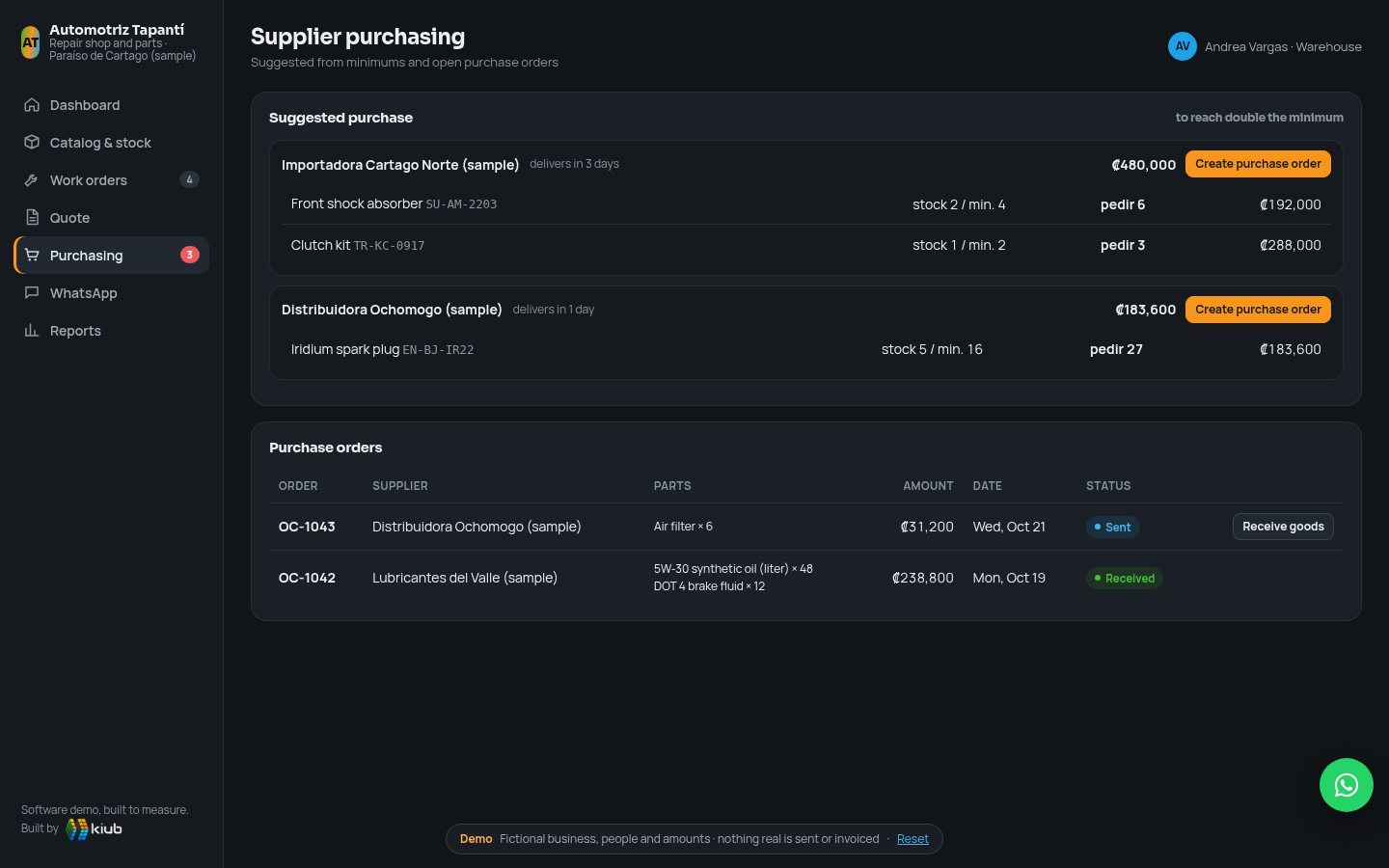
Supplier purchases
Suggested purchase based on minimums, grouped by supplier. You create the order, send it, and when the goods arrive the stock updates itself.
Reports
Turnover and margin by category, sales by month and parts with no movement, along with the money tied up in them. You decide what to promote and what to stop buying.
Alegra, Zoho Inventory, Tekmetric, AutoLeap and Shopmonkey are solid products. The question is which one fits a shop that also sells parts in Costa Rica.
If all you need is inventory and e-invoicing, a general ERP like Alegra costs quite a bit less, and we'll say so plainly. Custom makes sense when you want, in a single system, compatibility by vehicle, work orders that deduct from inventory, quotes by WhatsApp and purchases from your suppliers, in Spanish, in colones and with invoices under Hacienda regulations.
Compatibility by vehicle
Search by make, model and year is the heart of the system. In a general ERP, that information ends up in the product name or in a note.
Shop and counter together
The work order and the counter sale use the same inventory. The shop platforms compared are designed for the shop; the ERPs, for retail.
Designed for Costa Rica
Colones, VAT, invoices under current Hacienda regulations, SINPE and WhatsApp. The shop platforms compared are in English and their pricing pages don't mention Hacienda or colones.
No per-user charge
Adding a mechanic or someone at the counter doesn't raise the monthly fee. In several of the plans compared, users or warehouses have limits.
The data is yours
Catalog, compatibilities, customers and each vehicle's history stay in your system. That catalog is an asset of your business.
Support in Spanish and in your time zone
You talk directly to the people who built it, from Escazú, and we tune it with the shop's real use.
Cumulative total cost
- kiub: development from US$3,900 to 4,900 (estimate in this proposal) + an assumed US$50/month for hosting, backups and basic support. That assumption is not an official kiub rate; it is defined in the proposal.
- We compare the lowest plan on each platform that includes inventory management according to its page: Alegra ERP Pro (5 warehouses), Zoho Inventory Premium, Tekmetric Start, AutoLeap Pro and Shopmonkey Clever.
- Shopmonkey includes its one-time US$500 data migration fee. AutoLeap says it charges a setup fee that varies by shop and doesn't publish the amount, so we haven't added it.
- It's not an identical comparison: Alegra and Zoho are general inventory and invoicing systems, with no shop work orders on their pricing pages. Tekmetric, AutoLeap and Shopmonkey are shop platforms, but aimed at the US.
- Does not include VAT (Alegra charges it separately), payment fees, additional users, migration or integrations. The platforms do include years of product development, apps and updates; with custom, future improvements are quoted separately.
Official prices checked
| Platform and plan | Annual | Monthly | Official source |
|---|---|---|---|
| Alegra ERP · Pyme 2 users, 1 warehouse | 30 | 40 | alegra.com ↗ checked Oct 22, 2026 |
| Alegra ERP · Pro 3 users, 5 warehouses | 52.50 | 70 | |
| Alegra ERP · Plus 5 users, 10 warehouses | 90 | 120 | |
| Zoho Inventory · Standard 3 users, 2 locations | 29 | — | zoho.com ↗ checked Oct 22, 2026 |
| Zoho Inventory · Premium 5 users, 4 locations | 79 | — | |
| Tekmetric · Start unlimited users | 179 | 199 | tekmetric.com ↗ checked Oct 22, 2026 |
| AutoLeap · Pro 5 users | 309 | 349 | autoleap.com ↗ checked Oct 22, 2026 |
| Shopmonkey · Clever 4 users | 359 | 399 | shopmonkey.io ↗ checked Oct 22, 2026 |
- Alegra: prices for Costa Rica, plus VAT; includes Hacienda e-invoicing v4.4. Pro supports up to 2,500 items.
- Zoho Inventory: the page shows the price per organization with annual payment and states that it excludes local taxes; it doesn't show the monthly price. Premium supports 3,000 orders per month.
- Tekmetric: doesn't charge per user or per order; the Start plan already includes inventory and suppliers.
- AutoLeap: inventory and suppliers start on the Pro plan (Essentials costs US$179 annual or US$199 monthly, without inventory). Its FAQ page mentions a variable setup fee.
- Shopmonkey: inventory and purchase orders start on Clever (Basic costs US$215 annual or US$239 monthly). Each additional user costs US$20 a month; data migration has a one-time fee of US$500.
Step by step, with visible progress
We understand how your shop works first and deliver in blocks. Your team uses the inventory with real data before work orders and purchases are connected.
Understand
Catalog, warehouses, suppliers, how you quote and invoice today and which makes and models you handle most. We define the scope and the final price.
Build and test
Catalog with compatibility, stock by warehouse, work orders, quotes, purchases and reports. Demos every week with your team.
Migrate and launch
We load your catalog from Excel, do the initial count by warehouse and train the counter, warehouse and mechanics.
A clear estimate from the start
Low end
- Catalog with compatibility by make, model and year
- Stock by warehouse with minimums, alerts and transfers
- Work orders that deduct parts
- PDF quotes and suggested purchases by supplier
- Turnover, margin and no-movement parts reports
High end
- Invoices under current Hacienda regulations on delivery or sale, directly or through your provider
- Notices through the official WhatsApp Business API
- Barcode scanning with the phone
- Counter sales with cash register close-out
- Catalog migration and assisted initial count
A chat assistant inside the inventory system that answers questions about your data with tables, charts and reports you can export to PDF or HTML. For example:
- “Which parts are below the minimum?”
- “Work orders by mechanic this month”
- “Parts with the highest turnover this quarter”
The data is made up. The work isn't.
This demo doesn't correspond to any client: the shop, the people, the license plates, the suppliers and the amounts are fictional. What is real is kiub's experience building custom systems for teams that work with us today.
“The system has helped us enormously to improve the organization of our company. We now have better control over project billing and can follow our team's work more closely, making day-to-day management easier.”
Before you start
Where does each part's compatibility come from?
From your own catalog and your suppliers' catalogs. In the project we load it from Excel by make, model and range of years, and your team completes it through use. If a supplier offers their catalog in a stable format, we evaluate importing it.
What happens if a mechanic uses a part that wasn't on the order?
They add it to the order from their phone and the stock is deducted when it's closed. If there isn't enough in the workshop, the system pulls from the main warehouse or flags that it's missing.
Does it work if I sell parts at the counter without going through the shop?
Yes. Counter sales use the same inventory and the same search by vehicle. At the high end of the range we include counter sales with cash register close-out.
Does it issue invoices under Hacienda regulations?
In the demo it's simulated. In the real system we prepare the system to issue invoices under current Hacienda regulations, directly or through your invoicing provider, so you don't invoice twice.
Do the WhatsApp notices go out on their own?
Yes, through the official WhatsApp Business API with approved templates. If you prefer to start without that cost, the system drafts the message and you send it yourself with one click.
Why not use Alegra, Tekmetric or Shopmonkey?
They're good products. If all you need is inventory and e-invoicing, Alegra is cheaper and built for Costa Rica. Custom makes sense when you want vehicle compatibility, work orders and purchasing connected in a single system, in Spanish and with invoices under Hacienda regulations. The comparison with sources and assumptions is above.

Real engineering, powered by AI
Code that is reviewed, tested and maintained. AI speeds things up, people stand behind the work. That's why we can offer affordable prices.
- ✔ Reviewed
- ✔ Tested
- ✔ Maintained
Want an inventory system like this for your shop?
With your catalog, your warehouses and your suppliers.
Tell us how you track parts today. We'll reply within 24 hours with the next steps.
WhatsApp: Costa Rica +506 6451 1884 · USA +1 786 603 9420